

Tailwind CSS 
Rapidly build modern websites without ever leaving your HTML.
Tailwind CSS is a utility-first CSS framework packed with classes like flex, pt-4, text-center and rotate-90 that can be composed to build any design, directly in your markup.
Hello UI5ers
An API for your design system.
Utility classes help you work within the constraints of a system instead of littering your stylesheets with arbitrary values. They make it easy to be consistent with color choices, spacing, typography, shadows, and everything else that makes up a well-engineered design system.
Customization
Since Tailwind CSS v4 the configuration is CSS-first: there is no tailwind.config.js anymore, everything lives in .vitepress/theme/custom.css.
Because VitePress ships its own reset, Preflight must not be loaded. Instead of the single @import "tailwindcss" the parts are imported individually:
.vitepress/theme/custom.css
@layer theme, base, components, utilities;

/* no "tailwindcss/preflight.css" - VitePress brings its own reset */
@import "tailwindcss/theme.css" layer(theme);
@import "tailwindcss/utilities.css" layer(utilities);

/* which files to scan for utility classes */
@source "./**/*.{vue,js,ts,jsx,tsx}";
@source "../../src/**/*.{vue,js,ts,jsx,tsx,md}";

/* use the html "dark" class VitePress toggles */
@custom-variant dark (&:where(.dark, .dark *));
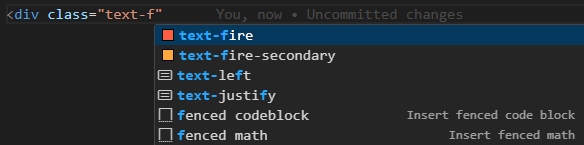
Customizing the color palette allows to add semantic color names like Fire and Water to your project. Every --color-* variable inside @theme automatically becomes a utility (text-fire, bg-water-secondary, …):
@theme {
  --color-fire: #ff5a37;
  --color-fire-secondary: #ffa42c;

  --color-water: #1873b4;
  --color-water-secondary: #53b8de;
}
The customized colors are supported by the Tailwind CSS tooling for VS Code:
Using PostCSS as preprocessor
Tailwind is used as a PostCSS plugin via @tailwindcss/postcss:
postcss.config.js
export default {
  plugins: {
    '@tailwindcss/postcss': {}
  }
}
Autoprefixer and cssnano are no longer needed
Tailwind CSS v4 handles vendor prefixing internally via Lightning CSS, and Vite minifies the CSS during build. Both Autoprefixer and cssnano were therefore removed from the setup.
This has a few benefits:
| Benefit | Description |
|---|---|
| Your builds will be faster | Since your CSS doesn’t have to be parsed and processed by multiple tools, your CSS will compile much quicker using only PostCSS. |
| No quirks or workarounds | Because Tailwind adds some new non-standard keywords to CSS (like @theme, @apply, @source, etc.), you often have to write your CSS in annoying, unintuitive ways to get a preprocessor to give you the expected output. Working exclusively with PostCSS avoids this. |
It’s tiny — never ship unused CSS again.
Tailwind automatically removes all unused CSS when building for production, which means your final CSS bundle is the smallest it could possibly be. In fact, most Tailwind projects ship less than 10kB of CSS to the client.